

PNB Online Banking Registration Procedure (Net Banking)

Organization:
PNB
Website:
Official Website PNB Branch
Eligibility
- You must have an active PNB account (Savings or Current).
- You have a PNB debit card linked to the account.
- You should have valid KYC documents updated with the bank.
- Registered mobile number with the bank is mandatory for OTP verification.
- Your account should not be restricted or blocked.
1. Retail / Individual Account Net Banking Registration
Online Registration (Self-Registration)
Who can use: Savings or Current account holders.
Steps:
- Visit PNB Net Banking Portal .
- Click New User Registration under Personal Banking.
- Enter Account Details
- Account Number
- Customer ID (found in passbook/cheque book)
- Registered Mobile Number
- Date of Birth
- OTP Verification
- Bank sends OTP to your registered mobile number.
- Enter OTP to verify identity.
- Set Login Credentials
- Choose Login ID
- Set Login Password and Transaction Password
- Note: Keep login and transaction password different for security.
- Confirmation
- Registration successful message appears.
- Time: Instant or within 24 hours.
Documents Required:
- PAN Card (mandatory)
- Aadhaar / Passport / Driving License / Voter ID (for KYC)
- Active Mobile Number (linked with bank account)
Procedure to Register
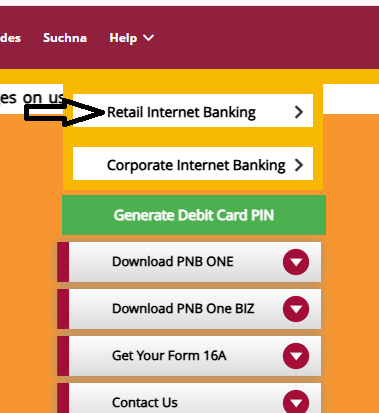
- Individual Account Net Banking के लिए 'Retail Internet Banking' पर क्लिक करें"
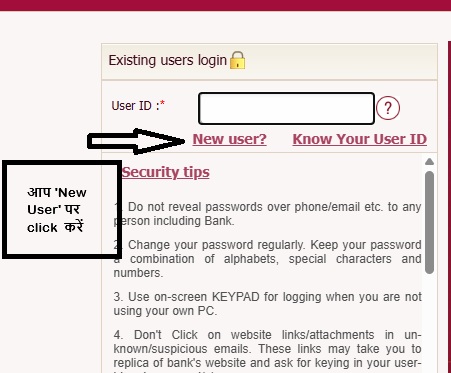
- अगर आपने पहले रजिस्टर नहीं किया है तो 'New User' पर क्लिक करें।
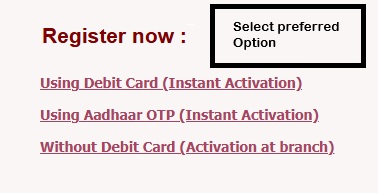
- ऑनलाइन रजिस्ट्रेशन के लिए अपनी पसंदीदा तरीका चुनें।
- कृप्या Official Document के अनुसार सही जानकारी भरें
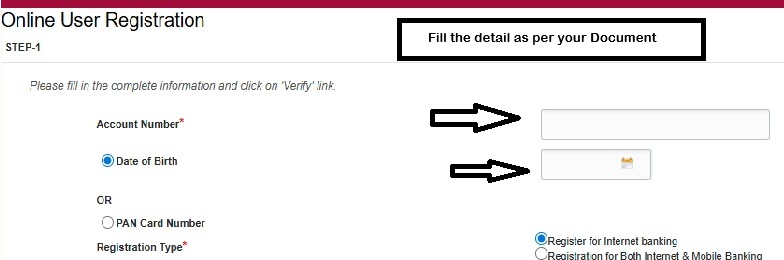
To expand image
Offline Registration (Branch-Based)
Steps:
- Visit the nearest PNB branch .
- Collect Net Banking Registration Form .
- Fill in details:
- Account Number, Customer ID, Name
- Mobile Number, Email ID
- PAN and Aadhaar
- Submit form along with original documents for verification.
- Branch processes the request; login credentials (User ID & Temporary Password) are issued:
- Via SMS / Email or hard copy.
- Time: 2-5 working days
.jpg)
2. Mobile Banking Registration (PNB ONE App)
Online via Mobile App
Steps:
- Download PNB ONE
- Select “New User / Registration”.
- Enter:
- Account Number
- Customer ID
- Registered Mobile Number
- Date of Birth / PAN
- OTP verification sent to mobile.
- Set MPIN / Login Password.
- Access mobile banking instantly.
- Time: 5-10 mins
Documents Required:
- PAN Card
- Aadhaar / Passport / Driving License
- Registered Mobile Number linked to account
Procedure to Sign In
- App open करने के बाद 'Proceed to Login' पर click करें |
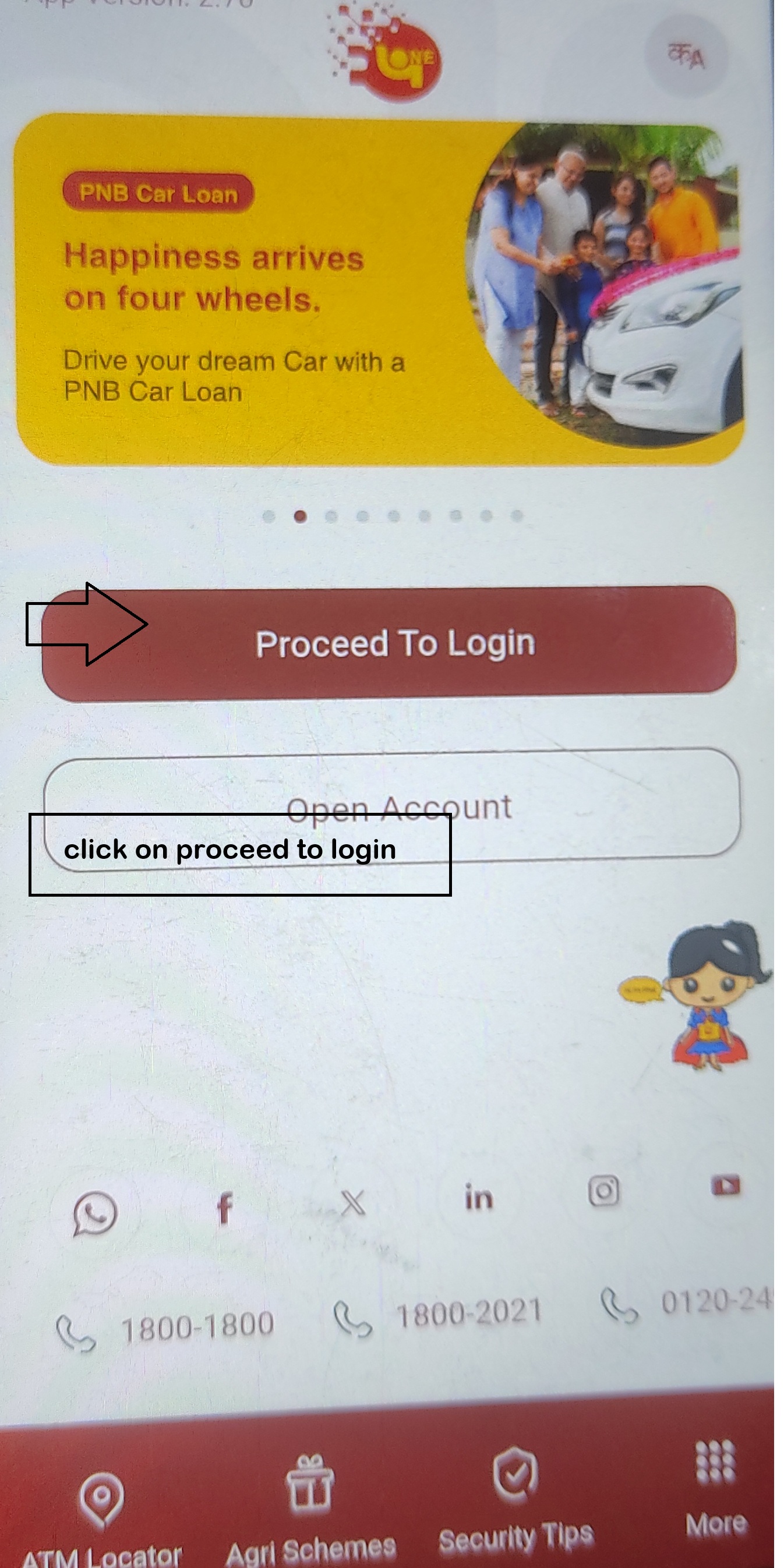
To expand image - अपना User ID enter करें जो ऑफिसियल डॉक्यूमेंट में हैं |
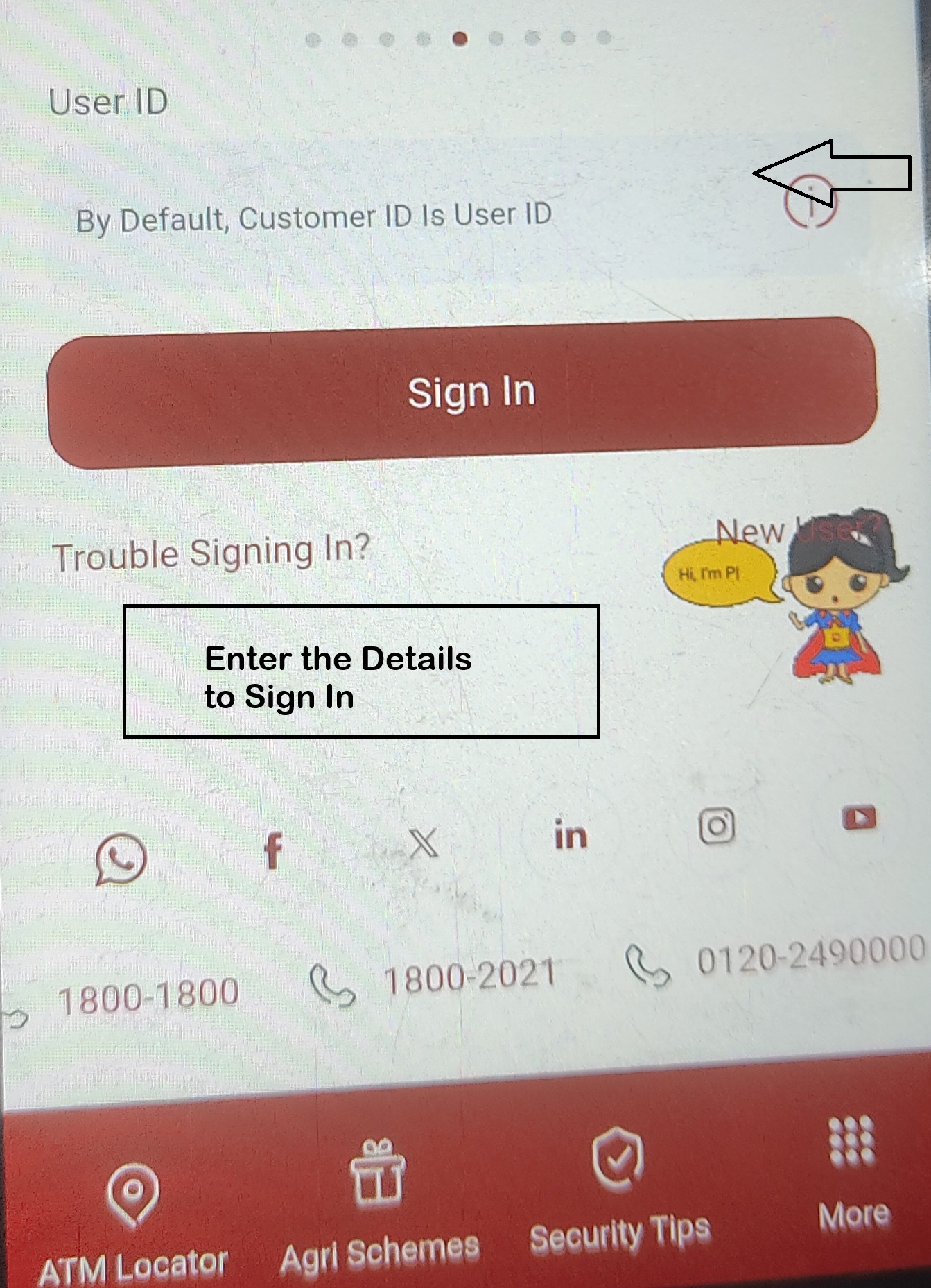
To expand image
Offline via Branch
- Visit nearest PNB branch .
- Submit Mobile Banking Appliction Form .
- Bank links mobile number and activates app credentials.
- Time: 2-3 working days
3. Registration via Customer Support:
- Call PNB Customer Care
- Dial one of the following numbers:
- Toll-Free: 18001800 or 18002021
- Tolled: 0120-2490000
- Provide Required Details
- Your PNB account number
- Registered mobile number
- Debit card number
- Debit card PIN
- Other personal details (e.g., date of birth, address) for identity verification.
- Receive Temporary Login Credentials
- Once your details are verified, the customer support representative will guide you and may provide temporary login credentials for your net banking account.
- Log in to Net Banking
- Visit the official PNB Net Banking Portal .
- Use the temporary credentials provided to log in.
- Set Up Your Account
- After logging in, you will be prompted to set your own:
- Login password
- Transaction password
- Confirmation
- After successful password creation, your Net Banking account will be ready for use, and you will receive a confirmation message.
- Time: 1-2 working days
4. Registration via PNB ATM:
Steps:
- Visit Any PNB ATM:
- Ensure that you have a PNB ATM-cum-Debit card and know your ATM PIN.
- Select the "Registration for Internet Banking" Option:
- Insert your ATM card into the machine.
- Enter your ATM PIN.
- From the ATM menu, select "Registration for Internet Banking" or "Online Banking Registration".
- Enter Your Account Details:
- You will be prompted to enter your account number and other necessary details (e.g., mobile number, email).
- Receive OTP:
- An OTP (One-Time Password) will be sent to your registered mobile number. Enter the OTP when prompted.
- Set Your Username and Password:
- After successful OTP verification, you will be asked to set a username and password for your PNB Internet Banking account.
- Complete Registration:
- After entering the details and confirming, the system will register you for PNB Internet Banking.
- Activate Internet Banking:
- You will receive a confirmation, and your Online Banking account will be activated. You can now use PNB Net Banking to perform various banking services online.
5. Corporate / Business Net Banking Registration
Online Registration (Corporate Internet Banking)
Who can use: LLPs, Companies, Firms, Organizations.
Steps:
- Visit Net Banking Portal → Corporate Login / New User.
- Enter Corporate ID, Branch Code, and Account Number.
- Verify Authorized Signatory Details (PAN, Aadhaar, Mobile).
- OTP sent to registered mobile/email of authorized signatory.
- Set login credentials and transaction rights (role-based).
- Time: 1-2 business days
Documents Required:
- Board Resolution authorizing users.
- KYC of authorized signatories (PAN, Aadhaar, Passport).'
- Company incorporation / LLP registration certificate.
- GST / CIN (if applicable)
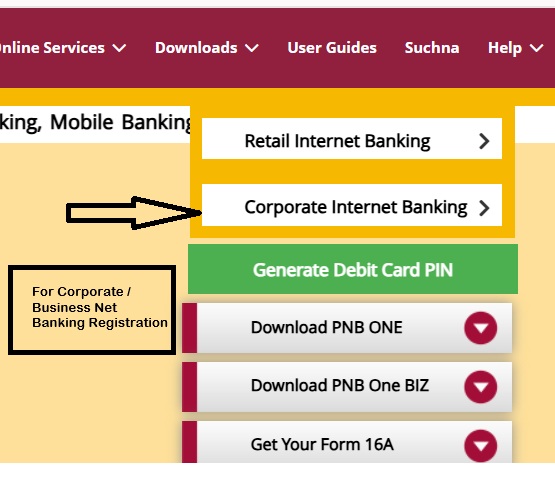
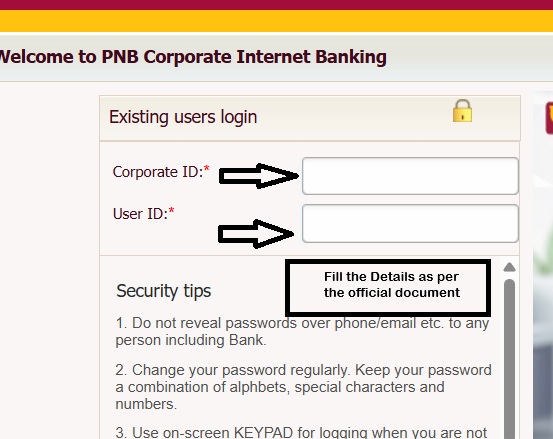
Procedure to Register
- Corporate Account Net Banking के लिए 'Corporate Internet Banking' पर क्लिक करें"|
- कृप्या Official Document के अनुसार सही जानकारी भरें|
Offline Registration (Branch-Based)
Steps:
- Visit PNB branch .
- Submit Corporate Internet Banking Application Form .
- Attach required documents:
- Board Resolution
- KYC of all signatories
- Account details and proof of incorporation
- Bank verifies details, provides login credentials to authorized users.
- Time: 3-7 business days
6. NRI / Overseas Account Net Banking Registration
Online Registration (via PNB NRI Portal)
- Visit PNB NRI Services → Net Banking Registration.
- Enter:
- Account Number
- Customer ID
- Registered Mobile Number / Email
- OTP verification sent to registered mobile/email.
- Set Login & Transaction Password.
- Access account online immediately.
- Time: Instant or within 24 hours
Documents Required:
- Passport
- Visa / OCI / PIO card (if overseas)
- PAN Card
- Overseas address proof (utility bill / bank statement)
Offline Registration (Branch-Based)
Steps:
- Visit PNB NRI branch or nearest PNB branch with NRI facilities.
- Submit NRI Net Banking Registration Form.
- Attach KYC documents (Passport, Visa, PAN, Overseas Address Proof).
- Bank issues login credentials after verification.
- Time: 3-5 working days
Points to Remember
- Registered mobile number must be active.
- Use official PNB portals or apps only.
- Keep login and transaction passwords different.
- Ensure KYC is updated before registration.
- Transaction limits vary by account type.
- Secure your device for mobile banking; avoid public Wi-Fi.
- OTPs and alerts will be sent for all transactions; check email & SMS regularly.
Parent Article:
